Buffer Operations
Create buffers around geometries and use them for proximity analysis in the FILTERING tab.
Overview
A buffer is a polygon representing all points within a specified distance from a geometry. In FilterMate, buffers are configured in the FILTERING tab alongside geometric predicates for proximity-based spatial filtering.
Key Uses
Buffers are essential for:
- Proximity analysis - Find features near something (e.g., buildings within 200m of roads)
- Impact zones - Define areas of influence (e.g., noise buffer around airport)
- Service areas - Coverage analysis (e.g., 500m walking distance to transit)
- Safety zones - Exclusion boundaries (e.g., 100m buffer around hazards)
Buffer configuration is in the FILTERING tab, below the geometric predicates selector. Buffers are applied to the reference layer geometry before spatial comparison.
Key Concepts
- Distance: How far the buffer extends (in specified units)
- Unit: Distance measurement (meters, kilometers, feet, miles, degrees)
- Buffer Type: Algorithm used (Standard, Fast, or Segment)
- Integration: Buffers work with spatial predicates (Intersects, Contains, etc.)
Buffer Types
FilterMate supports three buffer algorithms in the FILTERING tab, each with different performance and accuracy characteristics.
1. Standard Buffer (Default)
The standard algorithm creates accurate buffers suitable for most use cases.
Characteristics:
- ✅ Accurate results
- ✅ Handles complex geometries well
- ✅ Good for most use cases
- ⚠️ Moderate performance on large datasets
When to Use:
- General proximity analysis
- Planning applications
- Regulatory compliance (accuracy required)
- Medium-sized datasets (<10k features)
Example Configuration:
FILTERING Tab:
- Buffer Distance: 500
- Buffer Unit: meters
- Buffer Type: Standard
- Segments: 16 (smooth curves)
2. Fast Buffer
The fast algorithm prioritizes performance over precision.
Characteristics:
- ⚡ 2-5x faster than standard
- ⚠️ Lower geometric accuracy
- ✅ Good for large datasets
- ✅ Suitable for visualization and exploration
When to Use:
- Large datasets (>50k features)
- Interactive exploration in QGIS
- Approximate analysis where precision isn't critical
- Quick visualization of proximity zones
Performance Comparison:
Dataset Size  | Standard | Fast  | Speed Gain
--------------|----------|-------|------------
1,000 features| 0.5s     | 0.2s  | 2.5x
10,000        | 4.2s     | 1.1s  | 3.8x
50,000        | 21.3s    | 5.8s  | 3.7x
100,000       | 45.1s    | 11.2s | 4.0x
Example Configuration:
FILTERING Tab:
- Buffer Distance: 1000
- Buffer Unit: meters
- Buffer Type: Fast
- Fewer segments for speed
3. Segment Buffer
The segment buffer creates buffers with customizable segmentation for fine control over smoothness vs performance.
Characteristics:
- ✅ Fine control over segment count
- ✅ Balance accuracy vs speed
- ✅ Good for publication-quality outputs
- ⚠️ Requires understanding of trade-offs
When to Use:
- Publication-quality maps
- When you need specific smoothness
- Custom performance tuning
- Advanced users wanting control
Segment Count Guidelines:
- 4-8 segments: Fast, angular appearance
- 16 segments: Balanced (default)
- 32-64 segments: Smooth curves, slower
- 64+ segments: Publication quality, slowest
Example Configuration:
FILTERING Tab:
- Buffer Distance: 200
- Buffer Unit: meters
- Buffer Type: Segment
- Segments: 32 (high quality)
Buffer Configuration in FILTERING Tab
Distance and Unit Selection
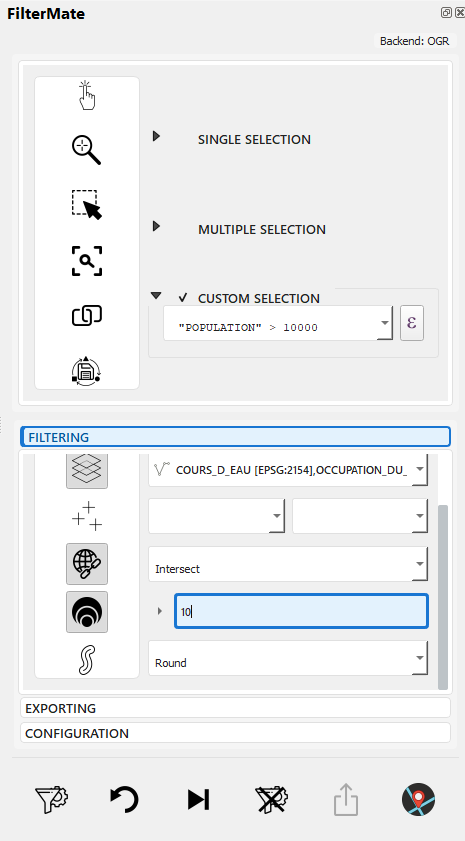
Configure buffer distance and select unit
Supported Units:
- Meters (m) - Most common for projected CRS
- Kilometers (km)
- Feet (ft) - US State Plane
- Miles (mi)
- Degrees - Geographic CRS (use with caution)
Ensure your layer uses an appropriate CRS:
- Projected (meters, feet): UTM, State Plane, local projections → Use meters/feet
- Geographic (degrees): WGS84, NAD83 → Convert to projected CRS first for accurate buffers
Distance Examples:
Urban planning:    50-500m
Transit access:    400-800m (walking distance)
Noise zones:       1-5km
Environmental:     100m-10km
Regional analysis: 10-100km
Buffer Type Selection
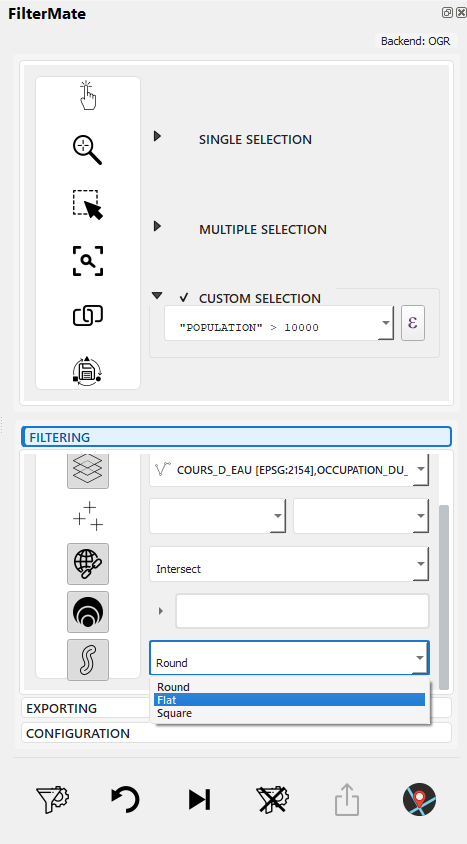
Choose buffer algorithm: Standard, Fast, or Segment
Selection Criteria:
| Scenario | Recommended Type | Why |
|---|---|---|
| Quick exploration | Fast | Speed over precision |
| Official reporting | Standard | Good accuracy |
| Large datasets (&>;50k) | Fast | Performance |
| Publication maps | Segment (32+) | Visual quality |
| Regulatory compliance | Standard | Reliable accuracy |
Buffer Integration with Geometric Filtering
Buffers work seamlessly with spatial predicates in the FILTERING tab:
Workflow:
- Select source layer (e.g., "buildings")
- Select spatial predicate (e.g., "Intersects")
- Select reference layer (e.g., "roads")
- Configure buffer: 200m, Standard type
- Click FILTER
What Happens:
- Reference layer geometry is buffered by 200m
- Spatial predicate (Intersects) is applied between source layer and buffered reference
- Result: Buildings that intersect roads within 200m
Example Use Cases:
| Source Layer | Predicate | Reference Layer | Buffer | Result |
|---|---|---|---|---|
| Buildings | Intersects | Roads | 200m | Buildings within 200m of roads |
| Parcels | Within | Protected Zone | 50m | Parcels within 50m inside zone |
| Facilities | Disjoint | Hazards | 500m | Facilities >500m` from hazards |
| POIs | Contains | District + Buffer | 100m | POIs in district + 100m margin |
| else OGR Fallback | ||||
| Q->>Q: QGIS buffer processing | ||||
| Q->>Q: Generate buffers | ||||
| end |
Q->>FM: Buffer count + preview FM->>U: Display result (1,234 features)
U->>FM: Apply buffer filter FM->>Q: Apply spatial filter Q->>U: Show filtered map
## Practical Examples

### Urban Planning

#### Transit Coverage Analysis
```python
# 400m walk to transit stations
buffer_type = "standard"
distance = 400
segments = 16

# Find residential areas NOT covered
expression = """
NOT within(
    $geometry,
    buffer(
        geometry(get_feature('transit_stations', 'active', 'yes')),
        400
    )
)
AND land_use = 'residential'
"""
Noise Impact Zones
# Highway noise zones (tiered)
# 100m: High impact
# 300m: Moderate impact
# 500m: Low impact

# High impact properties
expression = """
intersects(
    $geometry,
    buffer(geometry(get_feature('highways', 'type', 'major')), 100)
)
AND property_type = 'residential'
"""
Environmental Analysis
Riparian Buffer Protection
# 30m protected buffer around streams
buffer_type = "standard"
distance = 30
segments = 16

expression = """
intersects(
    $geometry,
    buffer(geometry(get_feature('streams', 'class', 'perennial')), 30)
)
AND development_status = 'proposed'
"""
Wildlife Corridor Analysis
# 500m habitat buffer
buffer_type = "geodesic"  # Large area, accurate
distance = 500
segments = 32

expression = """
within(
    $geometry,
    buffer(geometry(get_feature('habitats', 'priority', 'high')), 500)
)
AND land_cover = 'forest'
"""
Emergency Services
Fire Station Coverage
# 5km service area (quick response)
buffer_type = "fast"  # Large dataset
distance = 5000
segments = 8

expression = """
NOT within(
    centroid($geometry),
    buffer(
        aggregate('fire_stations', 'collect', $geometry),
        5000
    )
)
AND zone_type = 'residential'
"""
Evacuation Zone
# 2km evacuation buffer around hazard
buffer_type = "geodesic"
distance = 2000
segments = 32

expression = """
intersects(
    $geometry,
    buffer(geometry(get_feature('hazards', 'status', 'active')), 2000)
)
"""
Buffer + Filter Combinations
Multiple Buffer Zones
-- Properties in different risk zones
CASE
    WHEN distance($geometry, @hazard_geom) < 100 THEN 'high_risk'
    WHEN distance($geometry, @hazard_geom) < 500 THEN 'medium_risk'
    WHEN distance($geometry, @hazard_geom) < 1000 THEN 'low_risk'
    ELSE 'safe'
END = 'high_risk'
Exclusion Zones
-- Available land (not in protected buffer)
land_use = 'undeveloped'
AND disjoint(
    $geometry,
    buffer(geometry(get_feature('protected', 'status', 'active')), 500)
)
AND area($geometry) > 10000
Proximity to Multiple Features
-- Near transit OR major roads
(
    distance($geometry, geometry(get_feature('transit', 'type', 'station'))) < 400
    OR
    distance($geometry, geometry(get_feature('roads', 'class', 'highway'))) < 200
)
AND zone = 'commercial'
Performance Optimization
Backend Comparison
| Backend | Standard | Fast | Geodesic |
|---|---|---|---|
| PostgreSQL | ⚡⚡⚡ Fast | ⚡⚡⚡⚡ Faster | ⚡⚡ Moderate |
| Spatialite | ⚡⚡ Moderate | ⚡⚡⚡ Fast | ⚡ Slow |
| OGR | ⚡ Slow | ⚡⚡ Moderate | ❌ N/A |
Tips for Large Datasets
-
Use Fast Buffer for Exploration
# Quick interactive analysis
buffer_type = "fast"
segments = 8 -
Switch to Standard for Final Results
# Accurate final analysis
buffer_type = "standard"
segments = 16 -
Reduce Segments
# Balance accuracy and speed
segments = 8 # Instead of 32 -
Use PostgreSQL Backend
- Hardware-accelerated buffering
- Spatial index support
- 3-5x faster than Spatialite
Memory Considerations
# For 100k features with 500m buffers:
# - Fast buffer: ~200 MB RAM
# - Standard buffer: ~500 MB RAM
# - Geodesic buffer: ~800 MB RAM
Backend-Specific Behavior
PostgreSQL
Complete Buffer Workflow Example
Scenario: Find all buildings within 200m of roads
This example shows how buffers integrate with geometric filtering in the FILTERING tab.
Step-by-Step:
1. Open FILTERING tab
2. Select "buildings" as source layer
3. Select "Intersects" spatial predicate
4. Select "roads" as reference layer
5. Set buffer distance: 200, unit: meters
6. Select buffer type: Standard
7. Verify indicators: has_geometric_predicates, has_buffer_value, has_buffer_type all active
8. Click FILTER button
9. Progress bar shows processing (backend: PostgreSQL or Spatialite)
10. Results: 3,847 buildings within 200m of roads displayed on map
What Happened Behind the Scenes:
- Roads layer geometry was buffered by 200m using Standard algorithm
- Intersects predicate applied: buildings ∩ buffered_roads
- Backend (PostgreSQL/Spatialite) executed spatial query with buffer
- Matched features returned and displayed
Backend SQL (PostgreSQL):
SELECT buildings.*
FROM buildings
WHERE ST_Intersects(
    buildings.geometry,
    (SELECT ST_Buffer(roads.geometry, 200)
     FROM roads)
)
Backend SQL (Spatialite):
SELECT buildings.*
FROM buildings
WHERE ST_Intersects(
    buildings.geometry,
    (SELECT ST_Buffer(roads.geometry, 200)
     FROM roads)
)
Backend-Specific Buffer Behavior
PostgreSQL (Fastest)
-- Uses ST_Buffer (PostGIS)
ST_Buffer(
    geometry,
    distance,
    'quad_segs=16'  -- segments parameter
)
Advantages:
- Hardware acceleration via GIST indexes
- Parallel processing support
- Optimized algorithms for large datasets
- Best performance for >50k` features
Spatialite (Good)
-- Uses ST_Buffer (Spatialite)
ST_Buffer(geometry, distance)
Advantages:
- Good performance for medium datasets (less than 50k)
- No external dependencies
- Works offline
- Portable database file
Limitations:
- Fewer buffer customization parameters
- Slower than PostgreSQL on large datasets
- May lock database during buffer operations
OGR Fallback (Slow)
Uses QGIS processing algorithms:
processing.run("native:buffer", {
    'INPUT': layer,
    'DISTANCE': distance,
    'SEGMENTS': segments,
    'OUTPUT': 'memory:'
})
Limitations:
- No spatial index support
- Slower performance
- Limited to available QGIS algorithms
- Not recommended for >10k` features
For datasets over 50k features with frequent buffer operations, use PostgreSQL for optimal performance. Spatialite is good for datasets under 50k features.
Troubleshooting
Invalid Buffer Results
Problem: Buffer operation fails or produces empty results
Solutions:
-
Check geometry validity:
-- In attribute filter
is_valid($geometry) -
Repair geometries before buffering:
-- Use QGIS processing to repair layer first
processing.run("native:makevalid", {...}) -
Verify CRS is projected (not geographic)
Performance Issues
Problem: Buffer operation is very slow
Solutions:
- Reduce segment count - Use Fast buffer type or lower segments
- Filter attributes first - Apply attribute filters before buffer
- Upgrade backend - Switch to PostgreSQL for large datasets
- Check spatial indexes - Verify indexes exist on geometry columns
Performance Checklist:
- Spatial index exists on both source and reference layers
- Using Fast buffer type for exploration
- Attribute filters applied first
- CRS is projected (not geographic)
- Layer has less than 100k features OR using PostgreSQL
Unexpected Buffer Results
Problem: Buffer appears incorrect or missing features
Common Issues:
-
Wrong CRS units:
- Geographic CRS (degrees): 200 degrees = ~22,000 km!
- Solution: Convert to projected CRS first
-
Distance too small:
- Check layer CRS units match buffer units
- Example: Buffer of 200 in a CRS using feet = 200 feet, not meters
-
NULL geometries:
- Some features may have NULL geometry
- Filter them out:
geometry IS NOT NULL
-
Invalid geometries:
- Use
is_valid($geometry)to check - Repair with
make_valid($geometry)
- Use
Practical Examples
Urban Planning: Transit Access
Goal: Find residential parcels within 400m walking distance of transit
FILTERING Tab Configuration:
- Source Layer: residential_parcels
- Spatial Predicate: Intersects
- Reference Layer: metro_stations
- Buffer Distance: 400
- Buffer Unit: meters
- Buffer Type: Standard
Result: Parcels with good transit access for TOD (Transit-Oriented Development) planning
Environmental: Protected Zone Buffer
Goal: Identify buildings in 100m buffer around protected wetlands
FILTERING Tab Configuration:
- Source Layer: buildings
- Spatial Predicate: Within
- Reference Layer: protected_wetlands
- Buffer Distance: 100
- Buffer Unit: meters
- Buffer Type: Standard
Result: Buildings requiring environmental impact assessment
Safety: Hazard Exclusion Zone
Goal: Find facilities outside 500m safety zone from hazardous sites
FILTERING Tab Configuration:
- Source Layer: public_facilities
- Spatial Predicate: Disjoint
- Reference Layer: hazardous_sites
- Buffer Distance: 500
- Buffer Unit: meters
- Buffer Type: Standard
Result: Safe facility locations for public use
Related Topics
- Geometric Filtering - Spatial predicates used with buffers
- Filtering Basics - Combine buffers with attribute filters
- Interface Overview - Complete FILTERING tab guide
- Export Features - Save buffered results
Buffers are part of the geometric filtering configuration in the FILTERING tab. They work seamlessly with:
- Spatial predicates (Intersects, Contains, Within, etc.)
- Attribute filters (expressions)
- Reference layers (distant layers)
- Multiple layers (multi-selection)
Next Steps
- Export Features - Save your filtered results with buffers applied
- Filter History - Reuse buffer configurations from history
Complete Guide: See First Filter for a comprehensive workflow combining attribute filters, geometric predicates, and buffers.