Geometric Filtering
Filter features based on their spatial relationships with other geometries using the FILTERING tab's geometric predicates and reference layer selector.
Overview
Geometric filtering in FilterMate allows you to select features based on their spatial relationships with a reference layer. This is configured in the same FILTERING tab where you set up attribute filters.
Key Components in FILTERING Tab:
- Spatial Predicates: Multi-selection of geometric relationships (Intersects, Contains, Within, etc.)
- Reference Layer: Choose which layer to compare against
- Combine Operator: Use AND/OR when multiple predicates are selected
- Buffer Integration: Combine with buffer zones for proximity analysis
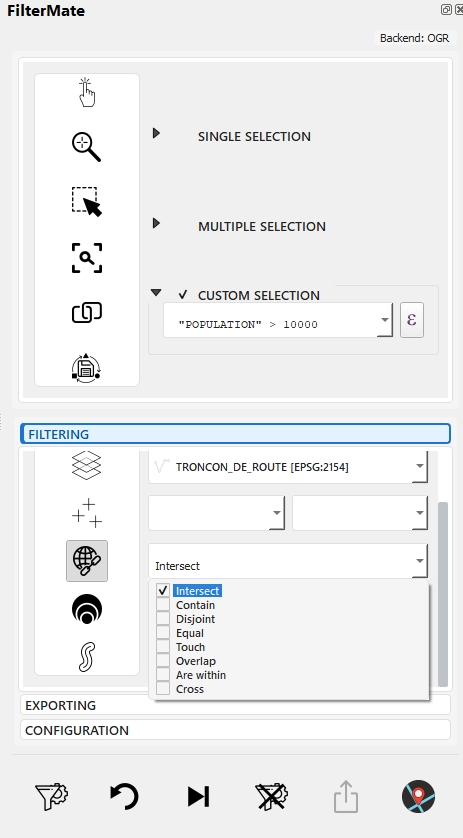
Multi-selection of spatial predicates in FILTERING tab
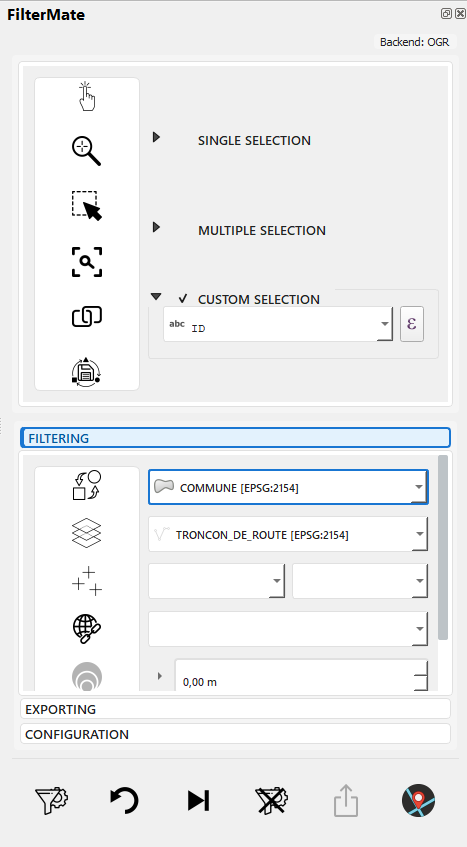
Select reference layer for spatial comparison
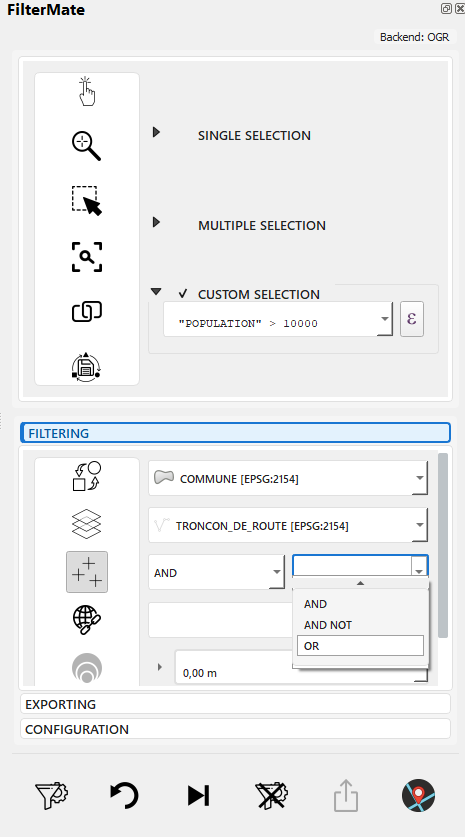
Choose AND/OR to combine multiple predicates
Common Use Cases
- Containment: Find parcels within a municipality
- Intersection: Identify roads crossing a floodplain
- Proximity: Select buildings near a transit station (with buffer)
- Adjacency: Find neighboring polygons
All geometric filtering is configured in the FILTERING tab, alongside attribute filters. Don't confuse this with the EXPLORING tab, which is for visualizing and selecting features from the current layer.
Spatial Predicates
Intersects
Features that share any space with the reference geometry.
Example Use Cases:
- Roads crossing a district
- Properties touching a river
- Parcels within or overlapping a zone
Expression:
intersects($geometry, geometry(get_feature('zones', 'id', 1)))
Contains
Reference geometry completely contains the feature (feature is entirely inside).
Example Use Cases:
- Buildings entirely within a parcel
- Parks completely inside city limits
- Points inside polygons
Expression:
contains(
    geometry(get_feature('parcels', 'id', @selected_parcel_id)),
    $geometry
)
Within
Feature is completely inside the reference geometry (inverse of Contains).
Example Use Cases:
- Find which district a point is in
- Properties entirely within a zone
- Features contained by a boundary
Expression:
within($geometry, geometry(get_feature('districts', 'name', 'Downtown')))
Overlaps
Features that partially overlap (some shared area, but neither contains the other).
Example Use Cases:
- Overlapping land use zones
- Conflicting property claims
- Intersecting administrative boundaries
Expression:
overlaps($geometry, geometry(get_feature('zones', 'type', 'commercial')))
Touches
Features that share a boundary but don't overlap.
Example Use Cases:
- Adjacent parcels
- Neighboring administrative units
- Connected road segments
Expression:
touches($geometry, geometry(get_feature('parcels', 'id', @parcel_id)))
Disjoint
Features that don't share any space (completely separate).
Example Use Cases:
- Features outside a restricted area
- Non-adjacent regions
- Isolated features
Expression:
disjoint($geometry, geometry(get_feature('restricted', 'id', 1)))
Crosses
A line crosses through a polygon or another line.
Example Use Cases:
- Roads crossing district boundaries
- Pipelines passing through zones
- Trails intersecting rivers
Expression:
crosses($geometry, geometry(get_feature('districts', 'name', 'Industrial')))
Geometric Functions
Distance Calculations
-- Features within 500 meters
distance($geometry, geometry(get_feature('stations', 'id', 1))) < 500

-- Find nearest features
distance($geometry, @reference_geom) < @max_distance
Area and Length
-- Large polygons (area in map units)
area($geometry) > 10000

-- Long roads (length in map units)
length($geometry) > 1000

-- Perimeter
perimeter($geometry) > 500
Centroid Operations
-- Features whose centroid is in a polygon
within(
    centroid($geometry),
    geometry(get_feature('zones', 'type', 'residential'))
)

-- Distance from centroid
distance(
    centroid($geometry),
    make_point(lon, lat)
) < 1000
Combining Filters
Spatial + Attribute
-- Residential buildings near transit
zone_type = 'residential'
AND distance($geometry, geometry(get_feature('transit', 'id', 1))) < 500
Multiple Spatial Conditions
-- Within district but not in restricted zone
within($geometry, geometry(get_feature('districts', 'id', 5)))
AND disjoint($geometry, geometry(get_feature('restricted', 'id', 1)))
Complex Scenarios
-- Properties near river but outside floodplain
distance($geometry, geometry(get_feature('rivers', 'name', 'Main River'))) < 200
AND NOT within($geometry, geometry(get_feature('floodplain', 'risk', 'high')))
AND property_type = 'residential'
Workflow Example: Geometric Filtering
Complete workflow for finding buildings near roads with buffer:
Step-by-Step: Complete Geometric Filter
Scenario: Find buildings within 200m of roads
1. Open FILTERING tab, interface ready
2. Select "buildings" layer in layer selector
3. Verify layer info: Spatialite, 15,234 features, EPSG:4326
4. Select "Intersects" in spatial predicates multi-selector
5. Select "roads" as reference layer (distant layer)
6. Set buffer: Distance=200, Unit=meters
7. Choose buffer type: Standard
8. View active indicators: geo_predicates, buffer_value, buffer_type
9. Click FILTER button (filter.png icon)
10. Progress bar shows backend processing (PostgreSQL⚡ or Spatialite)
11. Map displays filtered features: 3,847 buildings within 200m of roads
Combining Multiple Predicates
When you select multiple spatial predicates, use the Combine Operator to specify how they should be combined:
Select AND or OR to combine predicates
Example - Parcels that Intersect OR Touch a Protected Zone:
1. Select both "Intersects" AND "Touches" predicates
2. Choose "OR" in combine operator dropdown
3. "Has Combine Operator" indicator activates (add_multi.png)
4. Select "protected_zones" as reference layer
5. Apply filter: 1,834 parcels found
6. Parcels highlighted on map (intersecting OR touching zone)
Combine Operator Logic:
- AND: Feature must satisfy ALL selected predicates
- OR: Feature must satisfy AT LEAST ONE predicate
-- AND example: Must intersect AND touch
ST_Intersects(geom, ref) AND ST_Touches(geom, ref)

-- OR example: Can intersect OR touch
ST_Intersects(geom, ref) OR ST_Touches(geom, ref)
Backend-Specific Behavior
PostgreSQL (Fastest)
-- Uses GIST spatial index
ST_Intersects(geometry, reference_geometry)
- ✅ Full spatial index support
- ✅ Optimized for large datasets
- ✅ Hardware acceleration
Spatialite (Fast)
-- Uses R-tree spatial index
ST_Intersects(geometry, reference_geometry)
- ✅ R-tree spatial index
- ✅ Good performance for medium datasets
- ⚠️ Slower than PostgreSQL for complex queries
OGR (Fallback)
-- No spatial index
-- Scans all features
- ❌ No spatial index
- ⚠️ Performance degrades with size
- ✓ Universal compatibility
For large datasets with frequent spatial queries, use PostgreSQL with GIST indexes for best performance.
Practical Examples
Urban Planning
Find Parcels Near Transit
-- Within 400m walking distance
distance(
    centroid($geometry),
    geometry(get_feature('metro_stations', 'line', 'Red'))
) < 400
AND land_use = 'undeveloped'
Identify Development Opportunities
-- Large parcels, not in protected areas
area($geometry) > 5000
AND disjoint($geometry, geometry(get_feature('protected_areas', 'status', 'active')))
AND zone = 'mixed-use'
Environmental Analysis
Protected Areas Impact
-- Projects intersecting protected zones
intersects(
    $geometry,
    geometry(get_feature('protected', 'category', 'wildlife'))
)
AND project_status = 'proposed'
Watershed Analysis
-- Properties within watershed
within(
    $geometry,
    geometry(get_feature('watersheds', 'name', 'Main Watershed'))
)
AND distance($geometry, geometry(get_feature('rivers', 'id', 1))) < 100
Emergency Services
Coverage Analysis
-- Areas NOT covered by fire stations (&>;5km)
distance(
    centroid($geometry),
    aggregate('fire_stations', 'collect', $geometry)
) > 5000
Evacuation Routes
-- Roads within evacuation zone
intersects(
    $geometry,
    buffer(geometry(get_feature('hazard', 'type', 'flood')), 1000)
)
AND road_type IN ('highway', 'major')
Performance Optimization
1. Use Spatial Indexes
Ensure spatial indexes exist:
PostgreSQL:
CREATE INDEX idx_geom ON table_name USING GIST (geometry);
Spatialite:
SELECT CreateSpatialIndex('table_name', 'geometry');
2. Simplify Reference Geometries
-- Simplify before filtering (faster)
intersects(
    $geometry,
    simplify(geometry(get_feature('complex_polygon', 'id', 1)), 10)
)
3. Filter Attributes First
-- ✅ Fast: Filter by attribute first
status = 'active'
AND intersects($geometry, @reference_geom)

-- ❌ Slower: Spatial filter first
intersects($geometry, @reference_geom)
AND status = 'active'
4. Use Bounding Box Checks
-- Fast bounding box check before expensive spatial operation
bbox($geometry, @reference_geom)
AND intersects($geometry, @reference_geom)
Troubleshooting
Invalid Geometries
-- Check geometry validity
is_valid($geometry)

-- Repair invalid geometries (if needed)
make_valid($geometry)
CRS Reprojection
FilterMate automatically handles coordinate reference system (CRS) transformations when filtering layers with different projections.
Automatic Behavior:
- Target and reference layers can use different CRS
- FilterMate reprojects on-the-fly for spatial operations
- You'll see 🔄 indicator in logs when reprojection occurs
Best Practices:
- Use projected CRS for accurate distance calculations (e.g., EPSG:3857, local UTM zones)
- Avoid geographic CRS (EPSG:4326) for buffer operations - use meters instead of degrees
- Verify results after reprojection with visual inspection
Example:
Layer A: EPSG:4326 (WGS84) - Global coordinates
Layer B: EPSG:2154 (Lambert 93) - France projection
FilterMate: Automatically reprojects for comparison ✓
Frequent CRS transformations can slow down operations on large datasets. For best performance, ensure your layers share the same CRS before filtering.
Empty Results
- Check CRS compatibility - Ensure layers use compatible projections (see CRS Reprojection)
- Verify reference geometry - Confirm reference feature exists
- Test simpler predicates - Try
intersectsbeforecontains - Inspect geometries - Check for NULL or invalid geometries
Performance Issues
- Verify spatial indexes - Check indexes exist and are up-to-date
- Simplify geometries - Reduce vertex count if possible
- Use appropriate backend - PostgreSQL for large datasets
- Break complex queries - Split into multiple simpler filters
Related Topics
- Buffer Operations - Configure buffer zones in FILTERING tab for proximity analysis
- Filtering Basics - Combine geometric filters with attribute filters
- Interface Overview - Complete FILTERING tab component guide
- Export Features - Export filtered results from EXPORTING tab
The FILTERING tab combines three types of filters:
- Attribute filters - Expression builder (see Filtering Basics)
- Geometric filters - Spatial predicates + reference layer (this page)
- Buffer operations - Distance zones (see Buffer Operations)
All three can be used together in a single filter operation.
Next Steps
- Buffer Operations - Add distance-based proximity zones to geometric filters
- Export Features - Save filtered results in various formats
Complete Workflow: See First Filter Guide for a comprehensive example combining attribute, geometric, and buffer filters.